




The festive season is here — and what better way to celebrate than by turning your selfies into magical Christmas portraits using Google Gemini Nano Banana AI!
With the Nano Banana model in Gemini, you can keep your face exactly as it is and add festive vibes like snow, fairy lights, Christmas trees, Santa hats, cozy winter outfits — all with creative text prompts.
Whether you want an Insta feed makeover, a Reels cover, or a digital Christmas greeting card, these prompts are designed to generate ultra-realistic, cozy, and stylish results that are perfect for social media. Just copy & paste any of the prompts below into Gemini’s image editing input box after uploading your photo.
📸 How to Use These Christmas Prompts in Gemini Nano Banana
- Open Google Gemini and go to the “Create image/photo editing” tab.
- Upload a clear portrait/selfie of yourself.
- Paste one of the prompts from below into the prompt box.
- Click Generate / Edit and wait for the AI to create your festive image.
- Adjust details (lights, outfit style, background, snow intensity) if needed and download your Christmas photo.
Top 10+ Gemini Nano Banana Christmas Prompts for Girls
Here are ready-to-paste festive prompts that create unique Christmas memories:
Prompt #1 — Cozy Tree Glow
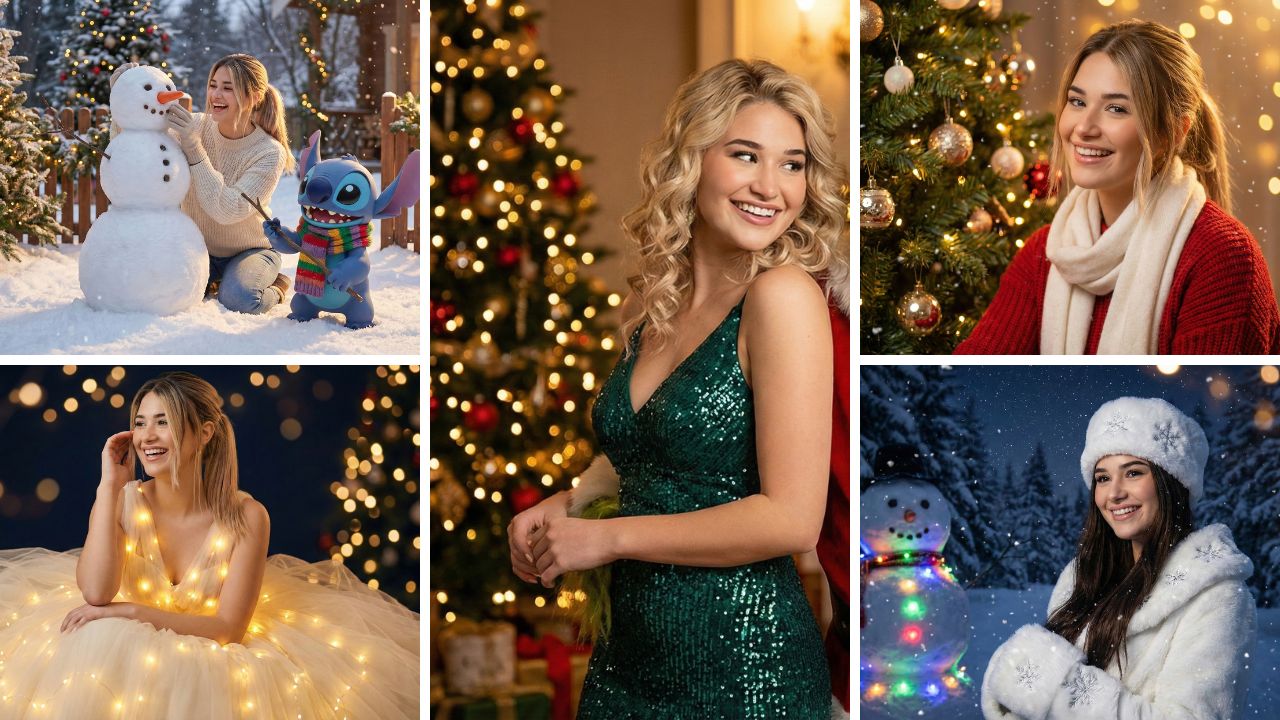
“Create an ultra-realistic Merry Christmas portrait using my exact face from the reference image with no changes to facial features. I’m sitting by a beautifully decorated Christmas tree with glowing fairy lights, warm bokeh lights in the background, gentle falling snow, wearing a cozy red sweater and soft winter accessories. Soft, cinematic lighting with a warm golden glow perfect for Instagram feed.”
Prompt #2 — Winter Fantasy Snow Scene
“A Christmas fantasy winter portrait using my face exactly as in the photo, with a snowy night background, elegant white fluffy winter outfit, long dark hair, and a classic snowman beside me with colorful lights. Gentle snowflakes falling, cinematic lighting, and a magical festive atmosphere.”
Prompt #3 — Grinch Glam Holiday
“Glamorous festive portrait with me standing next to the Grinch in an elegant holiday indoor setup. I’m in a sparkling emerald dress with soft curls, glowing Christmas lights around, playful festive mood, shallow depth of field, cinematic look.”
Prompt #4 — Golden Glow Gala
“Enchanting winter portrait using my exact face from the photo, wearing a tulle dress lit from within by golden lights, dark navy background with warm blurred lights, soft glow, ultra-realistic textures — very cozy chic Christmas editorial vibe.”
Prompt #5 — Snowman Fun with Stitch
“High-detail winter scene with my exact face preserved, building a snowman with Stitch wearing a colorful scarf, bright winter lights and garlands, soft snow gently falling — joyful Christmas atmosphere with cinematic lighting.”
Prompt #6 — Sled Ride Action Shot
“Ultra-realistic Christmas action portrait of me sledding down a snowy slope with Stitch — fast motion, joyful laughter, bright winter colors, snow flying and glowing festive lights around. Keep my face and identity unchanged.”
Prompt #7 — Enchanted Candles
“Festive winter portrait with me in a fluffy white jacket holding two glowing magical candles in front of a decorated Christmas tree with warm bokeh lights. My facial features remain exactly as the original. Soft golden sparkles and winter magic mood.”
Prompt #8 — Rustic Christmas Chic
“Full-body elegant winter portrait using my exact face, cozy cream knit sweater, faux-fur coat, white winter boots, warm Christmas bokeh lights in the background, small rustic table with decorations — warm, dreamy holiday feel.”
Prompt #9 — Snowy Christmas Market
“Portrait at a festive snowy Christmas market with warm string lights, market stalls, evergreen trees, and glowing lights — keep my face exactly as in the photo. Soft, inviting holiday atmosphere with subtle snow.” (Inspired by general Christmas prompt trends)
Prompt #10 — Santa Hat Selfie
“Fun Instagram-style selfie with me in a Santa hat, gentle snowfall, twinkling lights, bright colors, warm cozy vibes and soft bokeh — face unchanged, cheerful Christmas spirit perfect for a holiday story post.” (Inspired by common festive prompt styles)
Prompt #11 — Glitter Snow Globe Look
“Make my portrait look like I’m inside a magical snow globe — gently swirling snow, glittery effects, sparkling lights and Christmas decorations all around — keep the face and style intact but add dreamy magical effects.” (Inspired by festive prompt collections)
Tips for Best Results
🎨 Details matter — the more specific your prompt (colors, background, lighting), the more realistic the AI edit will look.
📸 Use high-quality selfies with good lighting and minimal background distractions for best results.
🔄 Try variations — change outfits, or add text like “Merry Christmas” or “Happy Holidays” to make your image stand out.
Final Thoughts
With Gemini Nano Banana, even beginners can create stunning Christmas visuals easily — no Photoshop skills required.
These prompts are perfect for girls who want cozy, Insta-worthy, festive portraits that capture the holiday magic and spread joy on social media!