



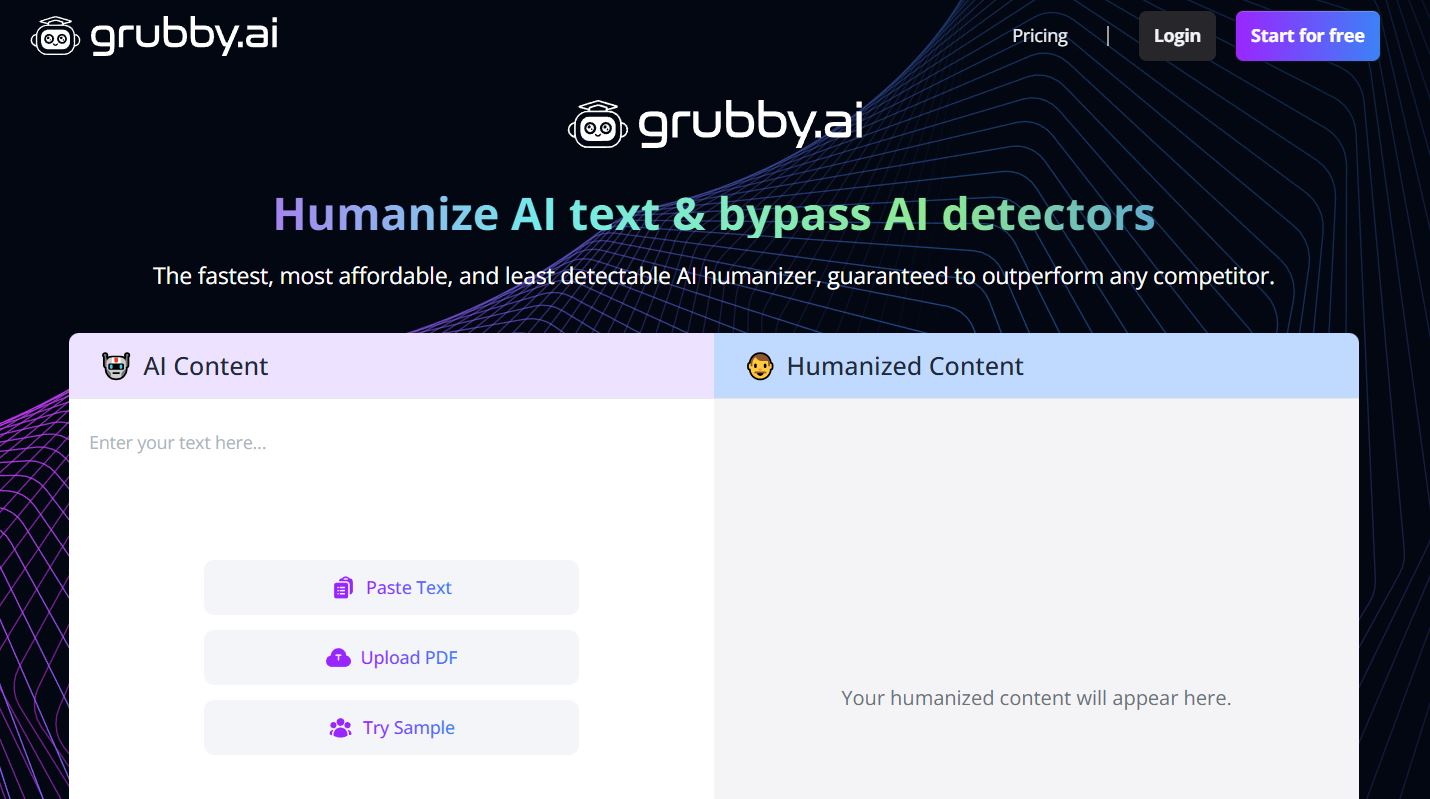
Grubby AI is a web-based text humanization tool designed to transform AI-generated or robotic-sounding writing into natural, human-like content.
It’s primarily used by writers, students, marketers, and professionals who want their text to read naturally and avoid being flagged by AI content detectors like Turnitin, GPTZero, Originality.ai, and similar systems.
What Is Grubby AI?
Grubby AI is an AI rewriting platform that takes text — often produced by AI generators like ChatGPT — and rewrites it to mimic human style, tone, and flow more closely.
Its goal is to remove telltale patterns of machine-generated content and replace them with organic sentence structures and vocabulary so the output feels like it was written by a person.
The tool markets itself as an “AI humanizer” that can help content pass through automated detection systems with fewer flags, improve readability, and better engage readers without losing the original meaning.
Key Features
🧠 AI Humanization
Grubby AI’s core function is rewriting text to make it sound natural and fluent, adjusting sentence structure, word choice, and stylistic elements.
🔍 AI Detection Bypass
The platform claims to reduce the likelihood of text being flagged by popular AI detection tools by modifying patterns that detectors look for in machine-generated content.
🎭 Tone & Style Options
Some versions let users choose writing tones or styles — such as formal, casual, or academic — to better match the audience or context of the content.
🌐 Multilingual Support
The tool supports rewriting in multiple languages, broadening its usefulness for global content creators.
⚡ Fast, Browser-Based Workflow
Grubby AI runs entirely in the browser — there’s no software to install. Users simply paste text, select options, and get rewritten output in seconds.
How It Works
- Paste or Input Text
Users add AI-generated text or rough drafts into Grubby AI’s editor. - Choose a Style/Tone (Optional)
Select a tone suited to your needs (such as academic, casual, or formal). - Humanize/Rewrite
Click to run the humanization process; Grubby AI rewrites the content to sound more natural and human-like. - Review & Use
Review the output and then copy it into your document, blog, essay, or other content.
Who Uses Grubby AI?
✍️ Content Creators & Marketers
Refine blog posts, product pages, emails, and marketing copy so it sounds authentic and engaging.
🎓 Students & Academics
Help essays, reports, and written assignments read more like human work and address concerns about rote AI phrasing.
📊 Professionals & Freelancers
Humanize drafts generated with AI tools to save time while maintaining professional tone and quality.
Pros & Highlights
✅ Improves Readability — Makes robotic AI text sound more natural and engaging.
✅ AI Detector-Aware — Designed to reduce patterns that automated detectors flag.
✅ Simple Browser Tool — No installation or complex setup required.
✅ Multilingual Capabilities — Works across various languages for broader use.
✅ Quick Processing — Rewrites content in seconds.
Considerations & Limitations
⚠ Not Foolproof Against All Detectors
Independent tests show that while Grubby AI can help reduce AI-like signals for some tools, strong detectors like GPTZero or Turnitin may still flag rewritten content, especially in academic settings.
⚠ Quality Can Vary
Rewrites often rely on surface-level changes (synonym swaps, light sentence restructuring), which might not fully eliminate stylistic “AI fingerprints.”
⚠ Ethical & Academic Integrity Issues
Using tools to evade detection in educational contexts may raise ethical concerns or violate academic policies — use responsibly and with awareness.
⚠ Manual Review Still Recommended
Even after humanization, proofreading and manual editing improve tone, clarity, and detection safety.
Final Thoughts
Grubby AI fills a niche in the modern content ecosystem by helping users refine and humanize AI-generated text, making it more readable and reducing patterns that automated detectors flag.
It’s especially useful for writers, marketers, and professionals who regularly work with AI drafts and want text that feels more authentic.
However, it’s not a perfect undetectability guarantee — strong detectors and strict academic standards can still identify machine traces, and ethical considerations should guide its use in academic or professional environments.