
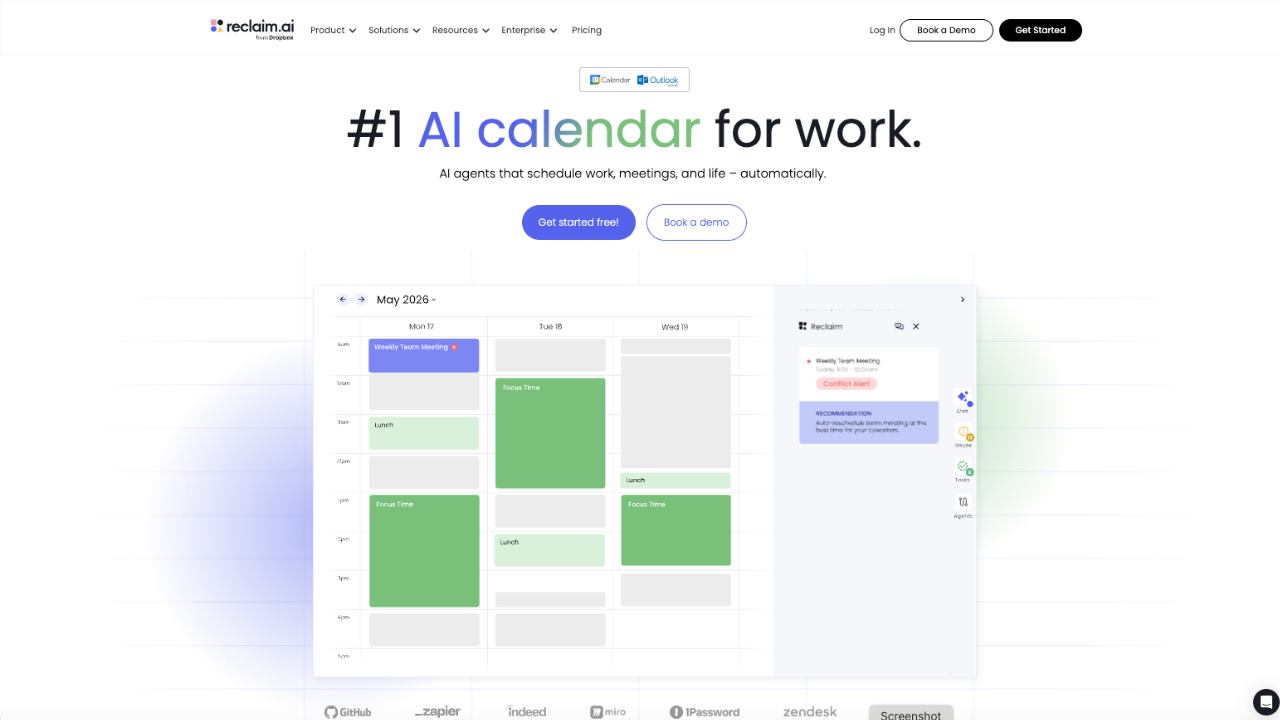
Managing a busy work calendar sounds simple until meetings start piling up, priorities change, and important tasks keep getting pushed to tomorrow. This is where Reclaim.ai comes in.
Reclaim.ai is an AI-powered calendar assistant designed to help individuals, managers, and companies make better use of their time. Instead of simply showing what is already on the calendar, it actively helps schedule tasks, protect focus time, manage meetings, and adjust plans when things change.
Reclaim describes itself as an AI calendar for work, and its newer 2.0 platform combines an AI Assistant, Planner, and background AI Agents to continuously optimize schedules around a user’s priorities.
Quick Intro to Reclaim.ai
Reclaim.ai is a smart scheduling tool that works with Google Calendar and Outlook. It helps people avoid spending too much time managing their schedule.
It automatically finds time for tasks, habits, focus work, and meetings, and adjusts the calendar when things change.
It also works for teams and companies to manage meetings, protect focus time, and improve how work hours are used.
Reclaim is now part of Dropbox and focuses on smarter time management and better workweeks.
What Does Reclaim.ai Do?
At its core, Reclaim.ai turns a normal calendar into a more flexible scheduling system.
For example, suppose someone needs three hours of focused work this week. Instead of manually looking through the calendar for empty spaces, Reclaim can find suitable slots and protect that time around existing commitments.
If a meeting later takes one of those slots, the system can adapt the schedule and find another suitable time.
This approach is useful because work rarely goes exactly according to plan.
Key Features of Reclaim.ai
1. AI Focus Time
Focus Time is designed to protect blocks of uninterrupted time for important work. Users can set a focus-time goal, and Reclaim works around existing commitments to find space for deep work.
This can be especially useful for developers, marketers, writers, managers, and anyone whose work requires concentration.
2. Smart Meetings
Meetings can easily take over a workday. Reclaim’s Smart Meetings feature helps automate recurring meetings and manage scheduling conflicts.
Instead of treating every meeting as fixed, Reclaim can consider priorities and availability when finding suitable times.
3. Habits
Not everything on a calendar is a traditional appointment. Things like exercise, planning, lunch, learning, or weekly reviews also need time.
Reclaim’s Habits feature creates flexible recurring blocks that can move when the calendar changes, rather than forcing users to stick to one rigid time.
4. Buffer Time
Back-to-back meetings can be exhausting. Reclaim can automatically create buffer periods around meetings, giving users some breathing room before or after calls.
This small feature can make a surprisingly big difference during meeting-heavy days.
5. AI Agents
One of Reclaim’s biggest differences is its use of AI Agents.
Different agents can handle areas such as Focus Time, Habits, Buffer Time, Smart Meetings, and Meeting Quality. These agents work in the background to continuously optimize the schedule.
6. Scheduling Links
Reclaim also provides Scheduling Links that allow people to book meetings based on availability and scheduling priorities.
This can save users from the familiar back-and-forth of emails asking, “When are you free?”
7. Calendar Sync
People often have more than one calendar. Reclaim can sync calendars and help maintain accurate availability across multiple schedules. Its Calendar Sync feature keeps copies updated when the original events change.
8. Task Management
Reclaim can connect with task-management tools such as Todoist, Asana, ClickUp, Jira, Linear, and Google Tasks.
This means tasks don’t have to remain sitting on a separate to-do list. They can become part of the actual calendar and receive dedicated time.
9. Meeting Quality
Reclaim can also help with meeting hygiene by flagging invitations that need attention and providing reminders around meeting-related issues.
For busy teams, these small automations can reduce the amount of calendar administration.
10. AI Assistant and Planner
Reclaim 2.0 adds an AI Assistant that can help with scheduling, conflict resolution, and calendar analysis. Its Planner provides a central place to view and manage schedules while allowing users to preview changes before applying them.
That preview feature is handy because users can see what a proposed change will do before it affects their actual calendar.
Who Can Use Reclaim.ai?
Reclaim isn’t only for corporate executives. It can work for different types of users.
Individuals:
Freelancers, creators, employees, students, and professionals can use it to protect focus time, schedule tasks, and manage routines.
Managers:
Managers can use Reclaim to balance meetings, protect team focus time, and understand how workloads are distributed.
Companies:
Larger organizations can use team analytics, scheduling policies, delegated access, security controls, and organization-wide scheduling features.
Reclaim’s own product documentation positions the platform for individuals as well as teams and larger organizations. (reclaim.ai)
Reclaim.ai Pros and Cons
Pros
- AI automatically helps organize the calendar
- Protects focus time from meeting overload
- Flexible scheduling instead of rigid recurring blocks
- Supports Google Calendar and Outlook
- Works with popular task-management platforms
- Scheduling Links reduce meeting-booking emails
- Useful for individuals as well as teams
- Includes a free plan
- Business and enterprise features support larger organizations
- Preview mode lets users review calendar changes before applying them
Cons
- Some advanced features are locked behind paid plans
- The free plan has limits on users, scheduling range, calendar syncs, and integrations
- People with very simple calendars may not need such a powerful tool
- AI-based scheduling can take some time to configure properly
- Larger teams may need higher-priced plans for advanced administration and analytics
Reclaim.ai Pricing and Plans
Reclaim.ai offers a free plan along with paid options for teams. Pricing can change, so the official pricing page is the best place to check the latest rates. (reclaim.ai)
| Plan | Price | Best For |
|---|---|---|
| Lite | Free | Individuals and basic calendar management |
| Starter | $12/seat/month | Small teams |
| Business | $18/seat/month | Larger teams |
| Enterprise | Contact sales | Organizations with 100+ seats |
The free Lite plan includes features such as Focus Time, Habits, Buffer Time, Smart Meetings, Meeting Quality, five AI Agents, one calendar sync, one scheduling link, and limited integrations. (reclaim.ai)
The Starter plan expands the scheduling range and integrations and supports up to 10 seats. Business increases the limit to 100 seats and adds features such as unlimited calendar syncs, unlimited scheduling links, webhooks, team out-of-office calendars, and delegated access.
Enterprise is aimed at larger organizations and adds capabilities such as unlimited AI Agents, SSO and SCIM provisioning, and organization-aware scheduling intelligence.
Reclaim also offers discounts for eligible students and educators, nonprofits, startups, and people switching from certain competing services.
Reclaim.ai Integrations
One of the platform’s strengths is that it doesn’t require users to completely change their existing workflow.
Reclaim supports integrations with tools including:
Reclaim supports integrations with tools including:
- Google Calendar
- Outlook Calendar
- Todoist
- Asana
- ClickUp
- Jira
- Linear
- Google Tasks
- Slack
- Zoom
- Google Meet
- Raycast
The platform can also connect with AI workflows through MCP integrations, including tools such as ChatGPT and Claude.
Reclaim.ai for Businesses
For companies, the value of Reclaim goes beyond simply finding empty calendar slots.
Managers can look at how much time teams spend in meetings, whether employees have enough focus time, and where scheduling problems are creating bottlenecks.
This makes the calendar more than a personal productivity tool. It can become a source of useful information about how a team actually works.
For organizations trying to reduce unnecessary meetings and protect employee focus, that can be a worthwhile advantage.
Is Reclaim.ai Worth It?
For someone with a simple calendar and only a few weekly meetings, Reclaim may feel like overkill.
But for people juggling meetings, projects, recurring responsibilities, multiple calendars, and changing priorities, it can be much more useful.
The biggest benefit isn’t simply that Reclaim puts events on a calendar. It’s that the platform tries to keep the calendar aligned with what matters most, even when the week gets messy.
That’s particularly valuable for managers and teams where small scheduling problems can quickly turn into bigger productivity issues.
Reclaim.ai Overview
Overall, Reclaim.ai is more than a traditional calendar app. It combines AI scheduling, task management, focus-time protection, meeting automation, calendar syncing, and productivity insights into one platform.
Its biggest strength is automation. Instead of constantly moving blocks around and checking when everyone is free, users can let Reclaim handle much of that work in the background.
The free plan makes it easy to test the basic experience, while paid plans are designed for people and teams that need more automation and control.
Conclusion
Reclaim.ai takes a different approach to calendar management. Rather than simply showing users where their time went, it tries to help decide where that time should go next.
For individuals, it can protect focus time, organize tasks, and reduce calendar chaos. For teams, it can help manage meetings, improve scheduling, and provide a clearer picture of how work time is being used.
In short, Reclaim.ai is a strong AI calendar option for professionals and teams that want to spend less time managing schedules and more time getting meaningful work done.
For anyone whose calendar feels like a never-ending game of Tetris, Reclaim.ai is certainly worth trying.
Official website: Reclaim.ai
Pricing: Reclaim.ai Pricing